Is Dust on a Fan Dangerous? Why You Shouldn’t Ignore a Dirty Fan
Minjin Park
·
A dusty fan may seem like a small housekeeping issue, but it can affect air quality, spread allergens, reduce performance, and create avoidable safety concerns. Learn how to clean fans safely and prevent dust buildup.
A fan is one of those household items that quietly becomes part of the background.
You turn it on during a hot afternoon. You use it at night for airflow. You run it in a home office, bedroom, garage, dorm room, or kitchen. It moves air, makes the room feel cooler, and asks for very little attention.
Until one day, you look closely.
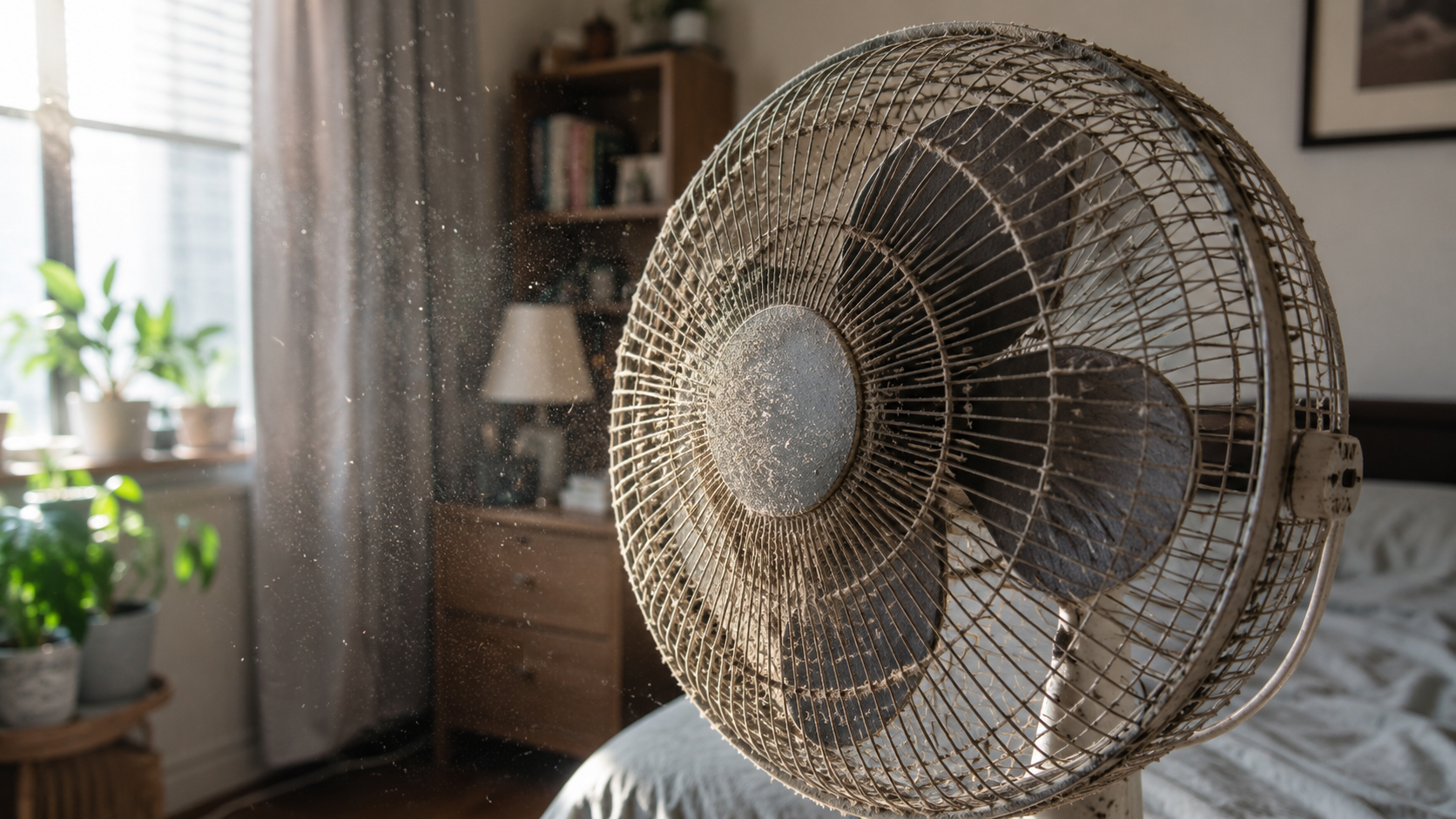
The blades are gray. The grill has fuzzy dust clinging to every bar. The base has lint around the buttons. Maybe there is a little dark buildup near the motor housing. When you turn it on, you see dust flutter out for a second before the fan settles into its usual hum.
It is easy to shrug and think, “It’s just dust.”
But leaving dust on a fan for too long is not ideal. It may not be an instant emergency, but it can create several everyday problems: dust gets blown around the room, allergies may feel worse, the fan may work less efficiently, and the motor may run hotter if buildup blocks airflow. In some situations, dust around electrical parts can add avoidable risk.
The good news is that fan dust is one of the easiest household problems to fix. You do not need special tools or a deep-cleaning weekend. A little routine cleaning can make the fan work better and keep the room feeling fresher.
Why Fans Collect So Much Dust
Fans collect dust because they move air constantly. Every time a fan runs, it pulls air from the room, pushes it forward, and creates airflow around the blades and grill. That air carries tiny particles with it.
Those particles may include:
Household dust Lint from clothing and bedding Pet hair and dander Pollen Cooking particles Skin flakes Carpet fibers Smoke residue Dust from open windows Tiny debris from nearby clutter
As air moves through the fan, some of those particles stick to the blades and grill. The faster the fan runs, the more air it moves. More air means more chances for dust to collect.
Static and moisture make it worse
Dust does not just sit there by accident. Fan blades can develop a slight static charge, helping dust cling to the surface. In humid rooms, dust can also become slightly sticky. If a fan is used near a kitchen, bathroom, laundry area, or open window, the buildup may become heavier or grimier.
That is why some fans look dusty, while others look almost greasy.
Bedrooms are especially dusty
Bedroom fans often collect dust quickly because bedding, pillows, blankets, clothes, and rugs release fibers. If you use a fan while sleeping, it may be running for many hours every night.
A bedroom fan can look fine from across the room, but once you remove the front grill, the blades may tell a different story.
Is Fan Dust Actually Dangerous?
The honest answer is: usually, a dusty fan is not something to panic about. But it is still worth taking seriously.
Fan dust can create practical problems that affect comfort, cleanliness, air quality, and appliance performance. The risk depends on how much dust has built up, where the fan is used, whether anyone in the home is sensitive to dust, and whether the fan is old, overheating, or poorly maintained.
A thin layer of dust is mostly a cleaning issue. Heavy buildup is a bigger concern.
The problem is that fans do not just sit there like dusty shelves. They actively move air. So whatever is on the fan may end up circulating through the room.
Dusty Fans Can Blow Particles Around the Room
A fan does not create dust, but it can spread it.
When you turn on a dusty fan, some loose particles may lift off the blades and grill. Even dust that stays stuck can still affect airflow patterns, moving dust from furniture, floors, curtains, and bedding into the air.
This matters most in rooms where people spend long periods of time, such as bedrooms, nurseries, offices, and living rooms.
You may notice more dust on surfaces
If a fan runs often in a dusty room, you may find that surfaces seem to get dusty faster. The fan keeps air moving, and moving air can prevent particles from settling neatly in one place.
Dust may land on nightstands, electronics, windowsills, dressers, and bedding.
It can make cleaning feel pointless
Some people wipe down a room and then feel like it looks dusty again the next day. A dirty fan may be part of the reason.
Cleaning the fan itself can make the rest of the room stay fresher longer.
Fan Dust Can Bother Allergies and Sensitive Airways
For people who are sensitive to dust, a dirty fan can be more than an eyesore.
Dust, pollen, pet dander, and other particles can irritate the nose, eyes, throat, or lungs. A dusty fan may make symptoms feel worse, especially when it runs close to the bed or desk.
You might notice:
Sneezing when the fan runs A scratchy throat in the morning Itchy or watery eyes More coughing in a specific room Dusty smells when the fan turns on Stuffiness after sleeping with the fan on More allergy symptoms near the fan
This does not mean the fan is the only cause. Carpets, bedding, pets, open windows, HVAC filters, and general cleaning habits all matter too. But a fan that visibly holds dust is an easy place to start.
Nighttime use can make it more noticeable
Many people sleep with a fan near the bed. If the fan is dusty, it may move particles around for hours while your face is close to the airflow.
A clean fan is especially important if you use it every night.
Dust Buildup Can Make the Fan Work Harder
A fan works best when the blades are clean and balanced.
Dust changes the surface of the blades. Heavy buildup can reduce airflow and make the fan less efficient. You may turn the fan to a higher setting because it no longer feels as strong, which makes the motor work harder.
The fan may become noisy
Dust can create imbalance. If one blade has more buildup than another, the fan may wobble, rattle, or vibrate.
A small wobble may not seem serious, but vibration can loosen parts over time. It can also make the fan annoying to use, especially at night.
The motor area can collect lint
The blades are not the only place dust lands. Dust can collect around vents, buttons, grills, and motor housing.
If airflow around the motor is blocked, the fan may run warmer than it should. Most household fans are designed for normal use, but they still need air around their internal parts.
A fan that smells hot, runs unusually loud, or shuts off unexpectedly should not be ignored.
Could Dust on a Fan Be a Fire Risk?
For most normal household fans, a little surface dust is not likely to start a fire by itself. But heavy dust buildup around electrical parts, blocked vents, damaged cords, overheating, or an old motor can create avoidable safety concerns.
The more dust there is, the more reason you have to clean and inspect the fan.
Dust plus heat is not a good combination
Dust is made from many materials, including fibers and lint. When dust builds up around a motor or electrical components, it can trap heat and reduce ventilation.
That does not mean every dusty fan is about to fail. It means dust should not be allowed to pile up indefinitely around anything that uses electricity and produces heat.
Old fans need extra attention
Older fans may have worn bearings, loose grills, damaged cords, or motors that run hotter than they used to. If an old fan is also packed with dust, the risk increases.
If the fan smells like burning, sparks, hums without spinning, gets unusually hot, or has a damaged cord, stop using it and replace or repair it appropriately.
Common Mistakes People Make With Dusty Fans
Dusty fans usually become a problem because they are easy to ignore.
Mistake 1: Cleaning only the outside grill
Wiping the front grill helps, but the blades behind it may still be coated. If the fan still smells dusty or looks gray inside, it needs a more thorough clean.
Mistake 2: Spraying cleaner directly into the fan
Spraying liquid into a fan can send moisture toward the motor or electrical parts. That is not a good idea.
It is safer to unplug the fan and apply cleaner to a cloth instead of spraying into the appliance.
Mistake 3: Forgetting to unplug it
This is a basic but important step. Always unplug a fan before cleaning it. Do not rely only on the power button.
Blades can move unexpectedly, and cleaning around electrical parts while plugged in is unnecessary risk.
Mistake 4: Running the fan to “blow the dust out”
Some people turn the fan on outside or near a window hoping it will clear itself. This may remove loose dust, but it also spreads particles and leaves stuck-on buildup behind.
A fan needs wiping, not just spinning.
Mistake 5: Ignoring the back grill and base
Dust often collects behind the fan, around the motor housing, and near air intake areas. These spots matter because they affect airflow and heat.
Mistake 6: Using a wet fan too soon
After cleaning, let parts dry completely before reassembling and plugging the fan back in. Moisture and electricity should not mix.
Warning Signs Your Fan Needs Cleaning or Replacement
A fan does not need to be spotless every day, but some signs mean it needs attention soon.
Look for:
Visible gray dust on the blades Fuzzy buildup on the grill Dust blowing out when turned on A musty or dusty smell Reduced airflow New rattling or wobbling The motor housing feeling unusually hot A burning smell The fan shutting off by itself A cord that is cracked, frayed, or loose Buttons or switches that feel unreliable
Cleaning may solve some of these problems. But if there is a burning smell, damaged wiring, sparks, or overheating, cleaning is not enough. Stop using the fan and replace it or have it checked.
How Often Should You Clean a Fan?
There is no perfect schedule for every home. It depends on how often you use the fan and how dusty the room is.
A good practical rhythm is:
Light dusting every week or two during heavy use Deeper cleaning once a month during fan season Cleaning before storing the fan away Cleaning again before using it after storage
Homes with pets, open windows, carpets, smokers, or high pollen may need more frequent cleaning.
If the fan looks dusty, it is ready. You do not need to wait for a calendar reminder.
How to Clean a Fan Safely
Always check the manufacturer’s instructions first, especially for tower fans, bladeless fans, or models with special filters. But for many basic pedestal, table, or box fans, the general approach is similar.
Step 1: Turn it off and unplug it
Unplug the fan from the wall. If it uses batteries, remove them if the design allows.
Do not clean a plugged-in fan.
Step 2: Move it to a good cleaning area
Cleaning a dusty fan can release dust. If possible, clean it outside, in a garage, or near an open window. If you are sensitive to dust, wearing a simple mask may make the job more comfortable.
Place the fan on a towel or easy-to-clean surface.
Step 3: Remove the front grill if possible
Many fans have clips, screws, or a twist-off grill. Remove it carefully and keep screws or small parts in a bowl so they do not disappear.
Do not force parts that are not meant to come off.
Step 4: Wipe the blades
Use a dry microfiber cloth first to remove loose dust. For sticky grime, use a slightly damp cloth with mild soap. Avoid soaking the blades.
Do not let water drip into the motor housing.
Step 5: Clean the grill
The grill often holds a lot of fuzzy dust. Wipe it with a cloth, use a soft brush, or wash removable plastic grills if the manual allows it.
Dry everything thoroughly before reassembly.
Step 6: Clean vents and motor housing gently
Use a dry cloth, soft brush, or vacuum brush attachment to remove dust around the back grill and motor vents. Be gentle.
Do not push dust deeper into the motor.
Step 7: Let all parts dry completely
Before plugging the fan back in, make sure every cleaned part is dry. Reassemble the fan securely.
Step 8: Test it briefly
Turn the fan on and listen. It should run smoothly without unusual wobbling, scraping, or hot smells.
Cleaning Tower Fans and Bladeless Fans
Tower fans and bladeless-style fans can be trickier because the blades are hidden. Many are not designed for easy disassembly.
For these, follow the manual. Usually, safe cleaning involves unplugging the unit, wiping the exterior, vacuuming intake vents with a brush attachment, and cleaning any removable filter if the model has one.
Avoid spraying cleaner into vents. Avoid taking apart the unit unless the manufacturer clearly explains how.
If a tower fan smells dusty even after exterior cleaning, the internal buildup may be hard to remove. In that case, consider whether replacement makes more sense, especially if the fan is old or weak.
Don’t Forget Ceiling Fans
Ceiling fans collect dust too, and because they are overhead, people often ignore them longer.
When a dusty ceiling fan starts spinning, dust can fall onto beds, sofas, tables, and floors. It can also spread particles through the room.
Clean ceiling fans carefully
Turn the fan off. Use a stable step stool or ladder. Do not stand on chairs that can wobble. A pillowcase trick works well: slide an old pillowcase over each blade, then pull it back to trap dust inside.
After that, wipe the blades with a damp microfiber cloth if needed.
Make sure the blades are dry before turning the fan back on.
Watch for wobbling
If a ceiling fan wobbles after cleaning, check whether dust buildup had been uneven or whether a blade is loose. Persistent wobbling may need adjustment.
Preventing Dust Buildup
You cannot stop dust completely, but you can slow it down.
Dust the room regularly
A fan in a dusty room will become dusty faster. Clean shelves, blinds, windowsills, and floors. Vacuum carpets and rugs. Wash bedding.
Keep the area around the fan clear
Do not place fans right next to laundry piles, pet beds, litter boxes, dusty storage, or open windows with heavy pollen if you can avoid it.
Clean or replace HVAC filters
If your home has central heating or cooling, filters matter. A dirty HVAC filter can allow more dust to circulate, which eventually ends up on fans and surfaces.
Follow your system’s filter schedule.
Store fans covered
Before storing a fan at the end of the season, clean it and cover it with a bag or cloth. This prevents it from collecting dust all winter in a closet, garage, or basement.
Use air purifiers thoughtfully
An air purifier can reduce airborne particles in some rooms, especially bedrooms. It does not replace cleaning, but it may help reduce dust that settles on surfaces and fans.
Special Care in Bedrooms and Nurseries
Fans used near beds, cribs, and children’s spaces should be kept especially clean.
In bedrooms, dust can come from bedding, clothing, rugs, and pillows. If a fan blows directly across the bed, any dust it carries may be more noticeable.
For nurseries, keep the fan clean, stable, and out of reach. Make sure cords are managed safely and the fan cannot tip over.
Do not place a fan where a child can poke fingers or objects through the grill.
Special Care Around Pets
Pet hair and dander can build up fast on fan grills and blades. If you have dogs, cats, rabbits, or other furry pets, check fans more often.
A fan near a pet bed may collect hair quickly. Hair can wrap around moving parts or gather near vents.
Clean pet-area fans regularly and avoid placing them where loose bedding, hay, litter, or fur can be pulled into the airflow.
When Cleaning Is Not Enough
Sometimes a fan is too old, damaged, or unreliable to keep using.
Consider replacing the fan if:
It smells hot or burnt when running. The cord is damaged. The plug is loose or bent. The fan sparks. The motor hums but blades do not spin. It overheats. It shuts off randomly. The grill is broken or missing. The blades are cracked. It wobbles badly even after cleaning.
A fan is not expensive enough to gamble with electrical safety. If it seems unsafe, do not keep using it just because it still turns on sometimes.
A Simple Fan Safety and Cleaning Routine
Here is an easy routine to remember:
Before fan season:
Inspect the cord, plug, grill, and blades. Clean dust from the grill, blades, and motor vents. Test the fan before relying on it daily.
During regular use:
Dust the outside weekly. Deep clean when blades look gray or airflow drops. Keep the fan on a stable surface. Keep cords out of walkways. Do not run a fan with a damaged cord or hot smell.
Before storage:
Clean the fan fully. Let all parts dry. Store it covered in a dry place.
This small routine keeps the fan working better and reduces the amount of dust it throws back into your room.
Final Thoughts: A Dusty Fan Is More Than a Cosmetic Issue
Dust on a fan is easy to ignore because the fan still works. But a dirty fan can spread dust around the room, bother allergies, reduce airflow, create noise or wobbling, and make the motor work harder. In older or damaged fans, heavy buildup around electrical parts can add avoidable safety concerns.
The fix is simple: unplug it, clean it regularly, keep dust away from vents, and inspect it for damage.
A clean fan does not just look better. It moves air better, smells fresher, and feels nicer to use, especially in bedrooms and small rooms where you spend a lot of time.
You do not need a perfect cleaning schedule. Just look at the blades and grill once in a while. If they are dusty, clean them before turning that dust into part of the air you breathe.
Hi, I’m the creator and editor behind ZestyHabit. I research everyday safety, first aid, and practical wellness topics using official guidance and reliable public sources, then turn that information into clear, realistic steps for daily life.
My goal is to help readers make safer, better-informed choices at home and beyond.



[…] Direct airflow from heating or cooling systems can dry out the throat. […]